An exploration of language technologies, translation education, practice and politics, ethical market strategies, workflow optimization, resource reviews, controversies, coffee and other topics of possible interest to the language services community and those who associate with it. Service hours: Thursdays, GMT 09:00 to 13:00.
Note: This post has been updated to reflect a planning change. The five-day trainer training course has been replaced with a two-day (eight hour) course for translators to master key memoQ features.
The CETAPS institute at Universidade Nova de Lisboa FCSH has planned a week-long (20-hour) memoQ online project management training course and a two day (8-hour) course on memoQ mastery for translators in the latter part of January 2024 which might be of interest.
The first course (from January 22nd to 26th) will be for those in project management roles or similar functions using memoQ TMS servers; it will begin with a day of intense review and instructional guidance for memoQ basics in online projects from a translator and reviewer perspective and proceed from there to topics such as online project creation and administration, rights and resource management, template use, optimal preparation workflows, mid-project updates and more as well as participant-specific issues. The cost is €480.
The second course (from January 29th to 30th) is aimed at translators and reviewers, who want to better understand and handle project workflows for both their own projects and agency-created ones. This will include resource customization, project management, project templates, file import filters, and project navigation, including some regular expressions magic. The cost is €90.
Further information on the course and an enrollment form can be found HERE. The registration period has been extended and enrollments will be accepted through January 5th. Questions regarding the program and enrollment can be directed to Prof. Marco Neves (e-mail: mfneves@fcsh.unl.pt).
Certificates will be issued to all participants completing the courses. Course availability is subject to sufficient enrollment.
The fifth open office hours session for the self-guided online course "memoQuickies Resource Camp" discussed segmentation problems with documents imported to translation environments such as memoQ, Trados Studio, Phrase, Cafetran Espresso, etc. and various ways that these issues might be identified so that they can be corrected.
Segmentation problems waste enormous amounts of time, and bad segmentation rules are a plague on the translation and localization service community. Unfortunately, nearly all the rules I have seen, for all working environments, simply suck sewage. memoQ's rules usually suck less, but still....
This week's talk presented, among other things, some methods for identifying segmentation trouble spots quickly and easily with the use of special regular expressions describing common patterns followed by texts with troubled segmentation. And a Regex Assistant library has been provided (and will be updated during the course period) to help with all of this.
The video and related course pages will remain completely open to the public, with downloads available, at least through the end of 2023. After that the pages and resources may be taken down for updates and reorganization in other courses.
The video recording of the lecture "What's wrong with my segmentation?" can be accessed on YouTube (embedded below) or course participants can access the page to download it by clicking the "segmentation rules" icon at the top of this article.
An important part of checking the performance of your segmentation rules and possibly improving them is to have a good sampling of test data. One of my favorite sources for this are the European Community archives at the DGT, where EU legislation and other important information is available in a parallel corpus of all the official languages of the Community.
Payment practices are a perpetual pain in Trashlation World. What professional translator or interpreter has not, at some point, faced difficulty getting paid for work delivered. Or in my case, consultant, independent solution developer and instructor, since I retired from translation three months ago and no longer accept such tasks in the increasingly thankless environment where they are requested.
Net never has become the modus operandi of too many wankers in the NMT-AI-MOUSE Fanboy and -gurl Klub, and when B of A, Barclays, Santander of some other clan of thieves fails to provide the desired credit for the Incredible Journey to Ruin, there will always be those AI Artists Formerly Known as Trashlators who understand that in matter of money, all that really matters is mindset.
Fuck you. Pay me. Well, imagine getting paid! Isn't that exciting? Fuck you. Pay me. I'm more excited by the structure of your fucking kneecaps and how fragile it is... SET YOUR MIND TO PAY ME.
But wait, Paulie, there may be a better way!
A perpetually solvent friend who owns a couple of German service companies once shared his secret: when in doubt, demand payment in advance. When there is no doubt, demand double. But what if the prospect just walks away? Offer them a peck on the check and hold the door for them in gratitude for the grief they are about to save you.
Times are hard. But payment practices are, alas, too often limp. Like a little mushroom past its sell-by date and full of mold and other things best not named.
I'm personally fortunate not to deal with many deadbeats; avoiding business with Italian and American companies certainly helps. Well, I have a soft spot for the Portuguese, but let's not go there.
I have another problem. I had administrative work even more than I hate not getting paid, and since I acquired a retired surgeon as a billing assistant and, at about the same time, took on a new role as a trainer for incoherent billing software like SAGE, not getting paid has been a source of surprising pleasure. But our five dogs still demand food, and if it does come in bags and come on time, well... there is that extra weight I'm carrying, the Portuguese pit bull is fond of reminding me.
And I am sure that many clients and friends and friends with the misfortune to be clients keep a special dartboard with my face on it for those times I get around to writing the bill after a year of so.
Fuck you. Pay me. Well fuck you. Write the fucking bill. Yeah, right, you tell me again how all that works here in Portugal where the tax laws are so screwy that almost none of the invoicing tools typically used by translators, companies involved with language services (regardless of whether they actually provide any) in other countries are compliant with Portuguese tax law, so I often feel myself well and truly fucked.
Enter the performance platforms such as Fiverr, which I am beginning to consider for certain recurring requests where I have asked Dios for a better intake process in which people tell me exactly what they need, provide the means of doing that, including the money to pay for the electricity to drive the tools I use to reach their goal and, well, just let me get on with it and make something nice and bless them for a change.
I started toying with platformed pre-payment about four years ago, when I started using Teachable as a way to demonstrate to memoQ and others how professional tools instruction could be improved and content could be shaped in more useful ways. I may not have been successful in convincing others to Do the Right Thing, but now that I have more time on my hands and have resigned myself to take a shot at that myself and maybe actually charge for all that knowledge that so many people mint money with, I am really, really glad that the Portuguese tax mysteries are handled in a way that does not involve me at all and is completely correct. No more constant special requests for special invoices for special people in special countries and special claims on my non-existent admin time.
So, that's the news, I guess. Next time you need a training video, a dash of regex for your project soup, a magical mysterious import filter for Formats Unknown or the like, there's a process. And it's not "fuck you". That's between consenting buyers and the platforms from which they draw their services....
It's a reasonable approximation of reality to say that no good deed goes unpunished, and that can certainly be said for the team of software artists formerly known as Kilgray. The groundlings have little idea of how very concerned the machine is to deliver the right god in communion for our times. No sausage from the golden Trados calf, no. no. The right Phrase is everything, and to delve the source of Memory for this revelation is Our Life's Work.
The ways of the Great CAT who art in Hungary are a mystery, and those lacking Faith are taken aback at a lack of transparency. But I, faithful in my productivity pilgrimage, brought my offering to the High Priest in the temple.
It was the Time of Offerings, of intelligence sacrificed to artificialities, offerings burnt before an MT God. Ours is a Merciful One, and yea though I walk slowly, very slowly through the Valley of Technical Debt I fear no loss of data, for I am not a user of Trados nor of Wordfast. In Orange Ecstasy I linger, savoring the gentle crush of bugs between my gnashing teeth.
Initiated in the Mysteries I am, the Nine to One of the mighty dollars, flowing like a river of corporate honey or puddling as piss in a petty pool on the commons.
But our Holy Ground needs a good charge of urea to grow the next best thing, so pay all ye faithful for your SMA renewal before the end of September, when there shall be Weeping and Gnashing of Teeth as the price of memoQ and its servicre and maintenance contract increase by a modest 20% for the nifty Translator Pro version.
And fear not, for I am with you. My rod and staff are needed in the garden to prop up an apple tree, but I can offer this at least: if you blow the deadline and have to pay an extra €20 or so for the SMA renewal this year after October 1st, evidence of that in the form of a purchase invoice or somesuch which reaches me by the end of 2023 on the hidden paths of e-mail or social media will receive as a blessing a discount "coupon" worth twice and half again that for a stay at the memoQuickies Resource Camp until March 2024.
Or if the high priest ever gets back to me as he said he would, maybe there will be an alternative route. You are all nonetheless blessed that you have in your professional hands a tool, which for all its shortcomings, beats the competition to death if you know how to unlock its power (which few really do).
Summer is almost over, but technically, "camping season" will continue in memoQ World until November 30th. Or maybe January 31st, depending on how you count.
Today, a three-month journey of exploration begins, covering six important kinds of resources to make work with the memoQ translation desktop and server environments more pleasant and efficient... and profitable. This self-guided online course will give participants full access to my 14 years of cumulative experience as a memoQ user translating, managing projects and developing hundreds of solutions with this world-leading productivity tool.
Click here or on the icon bar above to have a look at the course description and to see (and maybe download) some of the publicly available information and resources for better work in many language pairs.
The emphasis of teaching will shift to a new resource every two weeks (with auto-translation rules as the main topic for the first two weeks), but throughout the course, information will be added continuously to all topic sections as I trawl through, sort, upgrade and publish the best or most interesting stuff from my archives. And course participants have access to open virtual office hours each week on Thursdays and some other occasions, where any questions can be asked and special requests made.
A special enrollment discount of 40% is available for the first week (code: HALFOFFLAUNCH) until September 10th, but you can join at any time and work with any of the material posted, ask questions and receive feedback. Learning material and downloadable, ready-to-use and -adapt resources will continue to be added until the end of November, and the full course will remain online through January 2024. Enrollment fees and content are subject to change without notice.
Addendum 1:On Thursday afternoon, September 7th, 2023, a presentation was made to introduce the first course topic - "Auto-translation Rules for Everyone". The recording and slides can be foundhere.
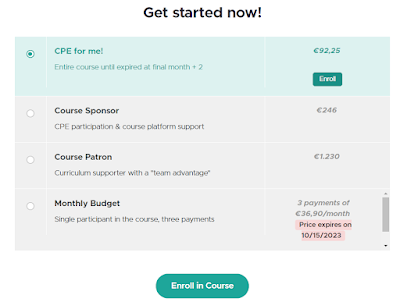
Addendum 2:Payment options for groups and monthly budgets have been introduced now. These options enable teams, departments and organizations to obtain blocks of passes for their members to receive continuing professional education in translation workflow tools. The host site applies VAT and other taxes where relevant and generates appropriate invoices. All relevant information can be found at the bottom of the information and enrollment page.
In the summer of 2021, I was coaching a group of project managers and translators at a Portuguese service company, helping them to develop processes to overcome some rather complicated filtering and configuration challenges for recurring project types. It was clear to me that some of their difficulties could be overcome with the use of templates, but I had only recently begun to use these productively myself, and my attempts to communicate the subject matter overwhelmed the group for the most part, and examining the sample templates provided with memoQ installation simply made matters worse.
After several frustrating tutorial sessions and the failed acceptance of a template that I had developed which was tailored to a rather long wish list of automation that came out of our discussions, I decided that the only way to make the value of templates clear to this group of professionals was to wipe the slate clean, forget about all the myriad "wishes" and build a few simple templates which did just a few simple things. Starting from a new configuration with nothing at all. Surprisingly, less was indeed more, and the frustrated people began to "get it".
At almost the same time, my friend and colleague Marek Pawelec, a gifted teacher whom I often refer to quite objectively as "a consultant's consultant", mentioned that he was thinking of writing a book on memoQ templates, because he found that most people were unable to avoid the problems in the example templates provided with memoQ installation, nor were they able to work out most difficulties encountered when making their own templates. I could understand this very well, because the user interface in the configuration dialog for a template is not a stellar example of clarity, and it took me years to make proper sense of much of it. Disappointing, really, because I had been part of the chorus begging for something like templates for years, but when they were delivered, little about them made obvious sense to a dummy like me.
He sent me a chapter he had drafted, where I noted that he had adopted the same reductionist approach to getting started. A template with just a pick list or two for meta data to avoid the problem I've had for years of accidentally using different designations for the same clients, subjects, domains, etc. He had come to the same conclusion independently that the best approach to helping people use templates effectively is to start with one or two simple things they do all the time but often mess up.
That interesting draft chapter took time to evolve into a full-fledged guide of nearly 70 pages, with many practical, relatable examples of the kinds of challenges that individual translators (and many other service providers) often face in configuring translation projects. The topics cover the full range of options, from very simple tasks to extremely complex workflows involving pre-import scripts for preparing translation data and post-processing to recreate the original data formats. At every stage he offers clear examples and guidance on how to make things work in cases I have seen time and again in more than two decades of commercial translation work.
I had the pleasure to edit two drafts of this work as it neared completion. And pleasure really is the right word to use here. Marek has a very different explanatory style than mine, but one which I prefer for my own education. He manages very well the deep dive into messy details without drowning the reader in jargon and other unhelpful complexity. His guide gives valuable suggestions and information for every level of expertise. Much of the content can be understood and applied by unsophisticated new users of memoQ, but some of the details on content connectors and scripting can light a chandelier full of bulbs in the heads of alleged experts like myself.
Templates for Translators is an essential reference work for all memoQ users in my opinion, the sort of thing which ought to have been provided seven years or so ago when templates were introduced. Instead we got some imperfect examples which too often - especially in the hands of under-trained PMs at translation agencies - result in unworkable projects with 50+ translation memories and term bases grinding performance to a halt or a lot of mysterious and unwanted automation that does stupid shit like write unfinished and defective translations directly into one's master TM.
In addition to explaining clearly how to create your own helpful project shortcuts and automation from scratch, Marek included a great chapter in which he describes in detail the templates provided for local projects, what works in them and what doesn't, and how to fix any issues so things work right for you. Even if you are a server user working primarily with online projects, there is a wealth of material in this version of the templates guide to help you work more effectively with templates for online projects. A second edition is planned for later this year, which will cover the additional features of templates for memoQ Server projects, but the real problems of most people working with those are covered in the basics presented in the "translators" edition, not in a lack of guidance on the many extra event "triggers" for online projects or other details. So if you are a server user, don't wait for the later edition, get this guide now, read every damned page and try to contain your exuberance as you finally understand a lot of stuff that has been confusing the Hell out of most of us for a long time. Then when the "server edition" of the guide is published, you'll be better prepared to absorb the increment of information it offers.
This book is now a valued part of my teaching "arsenal", and I recommend it without reservation to every memoQ user who aspires to work independently and create more effective processes for the special needs of various clients and subject matter. If you are a consultant or trainer at a serious level, it could well be considered malpractice to train without some of the information you'll find in Templates for Translators. But that's just what I see too often: discussions of templates glibly use the few defective examples installed with memoQ with little consideration given to how many translators should work in the real world with real, common client projects. This book is a welcome aid to move beyond all that and improve our satisfaction with the routine of translation in memoQ.
So for less than the cost of half an hour of consulting, the €30 invested here will save nearly anyone a large multiple of that and continue to pay dividends for a very long time, even if you understand and apply only 10% of the material presented. I charge far, far more to teach people less than that.
Note: this webinar has already taken place. A download link for the presentation slides (with links to unlisted instructional videos) is available below, as is some Q&A from the live session... there will be an online course offered soon for teams and project managers using memoQ Servers, so watch this blog for the announcement.
This Friday (April 23rd, 2021 at 2 pm Central European Time), I'll be giving an English-language talk via Zoom discussing my approach to using the memoQ Server and teaching others to do so for workflows involving small teams. These might be groups of collaborating independent service providers, in-house and freelance staff supporting translation and editing services in corporations or at boutique translation agencies, or university and continuing education courses with instructors and a group of student PMs and translators. This talk is not designed to cover the perceived needs of behemoths inhabiting the bulk market bog.
I will discuss the use of the memoQ Server and the hosted memoQ Cloud service with particular attention on user management, permissions, project workflows and resource availability. The last point also includes ideas for using a memoQ server as a platform to make some working "light resources" available which may be beyond the scope of a particular project.
There is no charge for the live webinar, though there will be a fee for those who wish to obtain a downloadable copy later. The recording will also be part of the reference resources provided in a professional continuing education course to be announced soon after some details on certified hour credits are worked out with the relevant Portuguese labor authorities and their representatives.
Register for the webinar here:
(registration now closed - see below for the presentation slides and Q&A)
I welcome all of you who are able to join me this week, and any others who may attend the online server skills course later or have particular training or problem-solving needs in this area.
These are "floating" licenses, not attached to a specific user unless you assign them.
(from Ellen Singer) : CAL (Concurrent Access Licensing)
Does a separate translator login also work when you want to work in your local client and only have a PM license and Webtrans licenses for a memoQ cloud subscription, No Translator Pro?
In that case you can assign a CAL license for some period of time (see the screenshot above), and this will make it available for offline use in a desktop edition of memoQ. For a basic memoQ Cloud subscription with just the PM license, it would be that PM license assigned (presumably) to you.
What are the advantages of a privately-run / hosted MemoQ server, over MemoQ cloud?
Several perhaps.
You have full control over all file paths. You don't have access to all file paths in memoQ Cloud. The only place I can see where that makes a real difference is when changing default resources as I described in my old blog post on that subject, but I think that is an important option for many company teams.
Maybe some economic advantage in the short or long run. A memoQ Server at your site represents a significant capital investment, and there are maintenance fees (about 20% of acquisition cost, isn't it?) incurred each year for support and upgrades. A memoQ Cloud subscription is a fairly manageable expense if it's small, but with a lot of licenses or added options like Qterm, customer portal, etc. it can be a pretty hefty monthly expense, though one which can be adjusted up or down as needed. And memoQ Cloud subscriptions can be suspended or reactivated as needed. Really, you would have to model the costs of each approach in a spreadsheet (or similar manner of calculation) to compare and determine definitively which approach gives you the greatest advantage.
I do believe that even for owners/operators of private memoQ Servers, the memoQ Cloud subscription (trial or paid) offers a superb platform for testing new versions, other "sandbox" work including development which will not endanger your production server and arms-length special projects with outside partners.
Can you create an unlimited number of Users, regardless of the number of licenses you purchased?
Indeed you can. Configured user logins can be configured in any number and have nothing whatsoever to do with any number of licenses you may have available. But if your access maximum for licenses has been reached at any given time, a configured user may have to wait some time until a current active (logged-in) user logs off the server so somebody else can get in to work.
We’ve been using mQ Server for a while now, and you tackled a few very interesting points. (Esp. concerning access control in case of PM accounts.)
With regard to access, I think there are two very important things to do, remember, configure, etc.
Use separate logins for your work as a PM or administrator and any work you may do as a translator/reviewer. These can have the same password for your convenience if you like. But for God's sake, use TWO SEPARATE LOG-INS. This will help you "stay in your lane" for a given role and prevent accidents. If you are logged in using an account that has project manager or administrative access privileges, you cannot easily tell sometimes (or may overlook) where you ought not to be working, and this can lead to difficulties.
"Permissions" can be used to restrict or enable access to any memoQ resources available on the server. This is not an easy topic to get your head around if you are unfamiliar with how permissions and access work in general on computers, especially in server environments, and anything you configure should be tested to ensure that you got the configuration right. The memoQ Help is rather good on this point and should be read and re-read and re-read and re-read carefully, and if there are doubts remaining, ask memoQ Support or other experts for advice.
A useful example of using "permissions" might be to assign an individual "Review" privileges to a specific TM or term base, enabling that person to do many maintenance operations on that resource which might otherwise be possible only with PM or general "terminologist" access. This approach would give a specialist for a rare language access to the specified resource(s) at a higher level, but that person's access would be more limited for other, similar resources (assuming there is no relevant group membership assigned that would provide such access.
Is it possible to do bulk changes to the permissions of more than one server resource at once?
Yes. Select the resources desired by control-clicking (for a discontinuous group) or shift-clicking (for a range in the list) and choose the "Set permissions" command. Changes made should apply to all the resources selected.
You mentioned a book on MemoQ. If so, can you let me have the title.
The book I mentioned in this talk is Marek Pawelec's excellent guide to the use of machine translation resources - including the extremely valuable pseudotranslation function. Information on that guide can be found here.
Yeah. Life is starting to feel normal again despite the usual continued death and destruction. But what does one do with babies if not put them in cages?
A course announcement for terminology users in memoQ (i.e. any sensible user):
Note: the pilot phase for this training course has passed, free enrollment has been closed, and the content is being revised and expanded for re-release soon... available courses can be seen at my online teaching site: https://transtrib-tech.teachable.com/
In the past few years I have done a number of long webinars in English and German to help translators and those involved in translation processes using the memoQ environment work more effectively with terminology. These are available on my YouTube channel (subscribe!), and I think all of them have extensive hotlinked indexes to enable viewers to skip to exactly the parts that are relevant to them. A playlist of the terminology tutorial videos in English is available here.
I've also written quite a few blog posts - big and small - teaching various aspects of terminology handling for translation with or without memoQ. These can be found with the search function on the left side of this blog or using the rather sumptuous keyword list.
But sometimes just a few little things can get you rather far, rather quickly toward the goal of using terminology more effectively in memoQ, and it isn't always easy to find those tidbits in the hours of video or the mass of blog posts (now approaching 1000). So I'm trying a new teaching format, inspired in part by my old memoQuickie blog posts and past tutorial books. I have created a free course using the Teachable platform, which I find easier to use than Moodle (I have a server on my domain that I use for mentoring projects), Udemy and other tools I've looked at over the years.
This new course - "memoQuickies: On Better Terms with memoQ! 10 Tips toward Term Base Mastery" - is currently designed to give you one tip on using memoQ term bases or related functions each day for 10 days. Much of the content is currently shared as an e-mail message, but all the released content can be viewed in the online course at any time, and some tips may have additional information or resources, such as videos or relevant links, practice files, quality assurance profiles or custom keyboard settings you can import to your memoQ installation.
These are the tips (in sequence) that are part of this first course version:
Setting Default Term Bases for New Terms
Importing and Exporting Terms in Microsoft Excel Files
Getting a Grip on Term Entry Properties in memoQ
"Fixing" Term Base Default Properties
Changing the Properties of Many Term Entries in a Term Base
Sharing and Updating Term Bases with Google Sheets
Sending New Terms to Only a Specific Ranked Term Base
Succeeding with Term QA
Fixing Terminology in a Translation Memory
Mining Words with memoQ
There is also a summary webinar recorded to go over the 10 tips and provide additional information.
I have a number of courses which have been developed (and may or may not be publicly visible depending on when you read this) and others under development in which I try to tie together the many learning resources available for various professional translation technology subjects, because I think this approach may offer the most flexibility and likelihood of success in communicating necessary skills and knowledge to an audience wider than I can serve with the hours available for consulting and training in my often too busy days.
I would also like to thank the professional colleagues and clients who have provided so much (often unsolicited) support to enable me to focus more on helping translators, other translation project participants and translation consumers work more effectively and reduce the frustrations too often experienced with technology.
The memoQ working environment includes a number of editing functions and modules, some better developed and more useful than others. Unfortunately, the terms "better" and "more useful" cannot be applied to many of those functions for creating and maintaining resources for auto-translation and many other functions. And, at the present time, integrated facilities for documenting the purpose and function of resources are usually limited to a short description field. The consequence of this can be, in a better case, some confusion, and if you are unlucky you might lose and or accidentally delete resources or apply a version unfit for use.
Auto-translation rule set editor with inadequate space for reading and writing the rules.
The auto-translation rule set editor is a particular headache for me. Scrolling back and forth in a tiny field to read and edit a long match rule (here, in the example of the number-matching auto-translation rules provided with the memoQ installation) is difficult and error-prone.
Even with the dialog-based editors which don't look much like editors (such as the example for QA options configuration below), it's hard to get an overview.
Unless I can compress all the relevant information into the description field for the resource, the only way I am going to get an overview of which functions are enabled is to go through all eight tabs for the QA profile in that dialog. Yuck. And the "why"? Maybe recorded in a notebook buried in the paper pile of my work table if I'm lucky.
There is a better way. And while that way is followed by a number of technically adept colleagues and developers I know, unfortunately it is not usually discussed and taught in workshops and other training venues, nor is it promoted by the software providers for memoQ in any way of which I am aware.
I typically recommend the use of specialized text editors, such as the free text and source code editor Notepad++for most development, maintenance and documentation tasks involving memoQ light resources. It is available at no cost to everyone and offers simple functions to help you get an overview, edit and document your resources. Only a tiny bit of arcane knowledge is required.
Armed with such a tool, or even with the simple Windows Notepad application, there are a number of useful things that can be done, such as:
Add <!-- comments -->to the text of an MQRES light resource file saved from memoQ
The markers shown in red in the previous line can be added to a line in the file to provide explanatory comments or maintenance instructions. In files with regex content, I often use comments to explain to myself the use of syntax that I will otherwise forget and be unable to understand in a matter of hours or at best weeks.
Example of an auto-translation rule set with comments added
Note that these comments are stripped when resources are imported into memoQ, remaining only in the original external file. Thus, a workflow involving external development and documentation in the resource files, with imports to memoQ for testing and use, is highly desirable. If deficiencies are found in the resource, it should be corrected externally in Notepad++, etc. and re-imported, not fixed in-situ in memoQ, where no information will be present regarding the resource, its purpose and mysterious details.
Comments of this sort night be added to a QA profile, for example, to give a quick overview of the resource and its purpose in more detail than the description field allows (and I often forget to update that description field, because it is in the header of the file, which is usually not of much interest for developing and testing configurations, except to note a version number and a few details).
Edit the resource more sensibly, using standard text editor features like search and replace
Often I'll decide to add nonbreaking spaces to a date or currency expression (or to the French output numbers in the "French Group" numbers auto-translation rule set provided with memoQ, which unfortunately probably still uses ordinary spaces as separators for thousands, millions, etc.), and this can be totally tedious in the internal editors of memoQ. Such tasks are much simpler in Notepad or Notepad++, for example.
It's also much simpler to find multiple instances of a word or structure that needs amendment or to do just about anything else when you can see all the content in a larger display.
Where resources are in fact simpler to develop inside memoQ, it is still worthwhile to export MQRES files as security. Comments added to these are a form of internal documentation which can avoid confusion and mistakes later when sorted file messes on a hard drive.
Teach and practice resource development and maintenance more effectively
A heavily commented resource file can be thought of as an easily portable "textbook" which includes a functional, importable example of its teaching. And when another person receives a copy of such a file as an example, it will be much easier to understand its structure and purpose and make any necessary changes.
UPDATE: The course registration deadline is Sunday, June 23rd!
Once again this year, I'll be team teaching a course with David Hardisty and Marco Neves (in English, open to all, with enrollment limited) at Universidade Nova de Lisboa (the New University in Lisbon, Portugal) on topics for best practice applying technology for more efficient and effective translation processes.
Click the graphic above to go to the Portuguese information page!
Details for costs (about €150 for those not enrolled at the university) are available here in English; the course instructors will assist those who cannot read Portuguese registration pages to register and handle other details as needed.
This year's topics include:
– Good translation workflows. – Using voice recognition in translation. – Using machine translation in a humane, intelligent way. – Using checklists to improve communication in translation. – Using glossaries, bilingual texts and other references in multiplatform environments. – Good practices for using terminology and reference texts in the target language. – Planning and creating lists for "autotranslatables" and the basics of "regular expressions" for filters.
There are some unannounced extras, but those will remain secret for now :-) And as time permits, individual challenges of course participants can also be addressed by the experts leading the course.
This is about as good as it gets for training costs; the university tuition is ridiculously low, and the 25 hours of instruction during the week of 15 to 20 July cost less than most half-day workshops while delivering far more. If it were up to me, I would probably increase the cost ten-fold, but that's because I'm a practical business person who understands commercial value, not a university administrator :-)
The course requires a basic knowledge of memoQ in advance, but much of the material goes well beyond that CAT tool. As always, integrated work with other environments, such as SDL Trados Studio and Wordfast is taught and emphasized.
I'll be presenting a free webinar on the uses, advantages, and quirks of memoQ's often underestimated and misunderstood LiveDocs module: everything you always needed to know about its features and corpora but never thought to ask.
When? On 23 April 2019 at 3:00 PM Lisbon time (4:00 PM Central European Time, 7:00 AM Pacific Standard Time); webinar attendance is free, but advance registration is required. The URL to register is:
After registering, you will receive a confirmation e-mail containing information about joining the presentation.
Particular questions regarding the subject matter or challenges you face with it are welcome in advance via e-mail, LinkedIn or other social media contact. I'll try to incorporate these in the presentation.
Accessing full bilingual document context in an alignment in LiveDocs from the memoQ Concordance
Recent versions of memoQ (8.4+) have seen quite a few significant improvements in recording and managing significant terminology in translation and review projects. These include:
Easier inclusion of context examples for use (though this means that term information like source should be placed in the definition field so it is not accidentally lost)
Microsoft Excel import/export capabilities which include forbidden terminology marking with red text - very handy for term review workflows with colleagues and clients!
Improved stopword list management generally, and the inclusion of new basic stopword lists for Spanish, Hungarian, Portuguese and Russian
Prefix merging and hiding for extracted terms
Improved features for graphics in term entries - more formats and better portability
Since the introduction of direct keyboard shortcuts for writing to the first nine ranked term bases in a memoQ project (as part of the keyboard shortcuts overhaul in version 7.8), memoQ has offered perhaps the most powerful and flexible integrated term management capabilities of any translation environment despite some persistent shortcomings in its somewhat dated and rigid term model. But although I appreciate the ability of some other tools to create customized data structures that may better reflect sophisticated needs, nothing I have seen beats the ease of use and simple power of memoQ-managed terminology in practical, everyday project use.
An important part of that use throughout my nearly two decades of activity as a commercial translator has been the ability to examine collections of documents - including but not limited to those I am supposed to translate - to identify significant subject matter terminology in order to clarify these expressions with clients or coordinate their consistent translations with members of a project team. The introduction of the terminology extraction features in memoQ version 5 long ago was a significant boost to my personal productivity, but that prototype module remained unimproved for quite a long time, posing significant usability barriers for the average user.
Within the past year, those barriers have largely fallen, though sometimes in ways that may not be immediately obvious. And now practical examples to make the exploration of terminology more accessible to everyone have good ground in which to take root. So in two recent webinars, I shared my approach - in German and in English - to how I apply terminology extraction in various client projects or to assist colleagues. The German talk included some of the general advice on term management in memoQ which I shared in my talk last spring, Getting on Better Terms with memoQ. That talk included a discussion of term extraction (aka "term mining"), but more details are available here:
Due to unforeseen circumstances, I didn't make it to the office (where my notes were) to deliver the talk, so I forgot to show the convenience of access to the memoQ concordance search of translation memories and LiveDocs corpora during term extraction, which often greatly facilitates the identification of possible translations for a term candidate in an extraction session. This was covered in the German talk.
All my recent webinar recordings - and shorter videos, like playing multiple term bases in memoQ to best advantage - are best viewed directly on YouTube rather than in the embedded frames on my blog pages. This is because all of them since earlier in 2018 include time indexes that make it easier to navigate the content and review specific points rather than listen to long stretches of video and search for a long time to find some little thing. this is really quite a simple thing to do as I pointed out in a blog post earlier this year, and it's really a shame that more of the often useful video content produced by individuals, associations and commercial companies to help translators is not indexed this way to make it more useful for learning.
There is still work to be done to improve term management and extraction in memoQ, of course. Some low-hanging fruit here might be expanded access to the memoQ web search feature in the term extraction as well as in other modules; this need can, of course, be covered very well by excellent third-party tools such as Michael Farrell's IntelliWebSearch. And the memoQ Concordance search is long overdue for an overhaul to allow proper filtering of concordance hits (by source, metadata, etc.), more targeted exploration of collocation proximities and more. But my observations of the progress made by the memoQ planning and development team in the past year give me confidence that many good things are ahead, and perhaps not so far away.
On December 28, 2018 from 2:00 to 3:30 pm Lisbon time (3:00 to 4:30 pm CET, 9:00 to 10:30 am EST), I'll be giving a talk on terminology extraction in the latest version of memoQ. Recent versions of this tool have included many improvements to its terminology features, and it's time for an update on how to get the most out of the term extraction features of memoQ among other things.
Topics to be covered
include the creation of new stopword lists or the extension of existing ones,
customer-, project- or topic-specific stopword lists, criteria for corpora, term
mining strategies and the subsequent maintenance and use of term bases in
projects. Participants will be equipped with all the information needed to use
this memoQ feature confidently, reliably and profitably in their professional
work.
The same presentation (more or less) will be held in German on December 21 at the same time for those who prefer to hear and discuss the topic in that language.
For some years now I have heard a steady stream of complaints from colleagues and clients about the availability and quality of memoQ instruction in the German language. There are of course a few excellent offerings of a general nature - usually for raw beginners - from some trainers I've known and respected for nearly two decades now, but there isn't a lot for users who need to go farther, particularly in some important specialist fields.
For nearly a decade now I have offered to assist the largest professional organization for language service providers in the German world (BDÜ) with filling this gap, but peculiar politics and strong input from SDL Trados partisans have prevented anything from happening. My recent acquisition of a long-term license for the Zoom conferencing platform and the positive experiences I have had with this tool for private and public teaching now put me in a position to deal with this without the nonsense of association and corporate politics.
So in September (date and topic to be announced) I will offer a first online workshop for German-speaking memoQ users. To aid in identifying topics of greatest interest for this and possible other talks I have put together a small survey in German (embedded below in this post - note that the embedded frame scrolls to view all questions in the survey - and also available at https://goo.gl/forms/Eq2mvqzdapaGDcjy1) to get an idea of the potential audience's position with memoQ and its training interests and needs. Please pass this around among our DACH colleagues and others in the translating germanophone world.
Click this graphic for more information and registration....
Didier Briel, current project manager of the Open Source OmegaT CAT tool, will discuss what makes this language service community resource unique, how it can enable you to work together comfortably in teams with others who use different tools (interoperability) and other interesting matters.
Have a look and see if this is the versatile, multi-platform tool you've been looking for!
Five years ago more or less I wrote a post in which I optimistically declared that if I ever did a one-hour webinar I would edit it down to perhaps twenty minutes. The real problem for me was that there was an ever-growing catalog of video instructional material from Kilgray, SDL and other sources but that it was virtually impossible to find parts of a video with specific points of interest without wasting a lot of time. Long teaching videos need a time index.
In a few blog posts after that, I created some manual indices for some of my videos, but all of these required manual scrolling to get to a particular point. And then, while using TechSmith Camtasia to touch up the recording of a recent webinar I did on PDF handling with iceni InFix, I stumbled across a menu item I had not noticed before:
Timeline markers? Hmmmm. Why would something like that be needed? Unless maybe one could build an index with them? And indeed that is the case.
When exporting a local MP4 video file or uploading a video production to YouTube, for example, the dialogs contain options to use these markers and their labels (the blue texts seen in the screenshot above on the video editing timeline) to build a table of contents.
Wow. This is exactly what I wanted to do for years. And Camtasia is used by a lot of people I know, so I wonder why nobody ever mentioned this possibility or how they could all overlook it. The result looked like this on YouTube:
All the blue number codes are hotlinks that jump the video to exactly that play time. This makes it easy to refer quickly to some important point of interest and skip the rest. Now I'm not going to go back and rework all of my old translation tool tutorial videos, but I'll use this feature for any new recordings, and I hope others do the same.
The video of the PDF talk is embedded below, but as you can see, the TOC isn't available with embeddings.
But there is sort of a workaround for that problem, using sharing links that include the starting time:
Click this graphic to go to 21:42 in the video
But that won't control an embedded video in a web page - like the one above. If anybody has a solution for that, I would love to hear it.
The Faculty of Sciences and Humanities held its first "CAT Tools Day" on June 16, 2018 with a diverse program intended to provide a lusophone overview of current best practices in the technologies to support professional translation work. The event offered standard presentation and demonstrations in a university auditorium with parallel software introduction workshops for groups of up to 18 persons in an instructional computer lab in another building.
The day began with morning sessions covering SDL Trados Studio and various aspects of speech recognition.
Dr. Helena Moniz explains aspects of speech analysis.
I found the presentation by Dr. Helena Moniz from the University of Lisbon faculty to be particularly interesting for its discussion of the many different voice models and how these are applied to speech recognition and text-to-speech synthesis. David Hardisty of FCSH at Universidade Nova also gave a good overview of the state of speech recognition for practical translation work, including his unobtrusive methods for utilizing machine pseudo-translation capabilities in dictated translations.
Parallel introductory workshops for software tools included memoQ 8, SDL Trados Studio 2017 and ABBYY FineReader - two sessions for each.
Attendees learned about ABBYY FineReader, SDL Trados Studio and memoQ in the translation computer lab
The ABBYY FineReader session I attended gave a good overview in Portuguese of basics and good practice, including a discussion of how to avoid common mistakes when converting scanned documents in a number of languages.
The afternoon featured several short, practical presentations by students, discussions by me regarding the upcoming integrated voice input solution for memoQ and the preparation of PDF files for reference, translation, print deadline emergencies and customer relations.
The final session of the day was a "tools clinic" - an open Q&A about any aspect of translation technology and workflow challenges. This was a good opportunity to reinforce and elaborate on the many useful concepts and practical approaches shown throughout the day and to share ideas on how to adapt and thrive as a professional in the language services sector today.
Hosts David Hardisty and Marco Neves of FCSH plan to make this an annual event to exchange knowledge on technology and best practices in translation and editing work in discussions between practicing professionals and academics in the lusophone community. So watch for announcements of the next event in 2019!
Some of the topics of this year's conference will be explored in greater depth in three 25-hour courses offered in Portuguese and English this summer at Universidade Nova in Lisbon. On July 9th there will be a thorough course on memoQ Basics and workflows, followed by a Best Practices course on July 19th, covering memoQ and many other aspects of professional work. On September 3rd the university will offer a course on project management skills for language services, including the memoQ Server, project management business tools, file preparation and more. It is apparently also possible to get inexpensive housing at the university to attend these courses, which is quite a good thing given the rapidly rising cost of accommodation in Lisbon. Details on the housing option will be posted on this blog when I can find them.
The pre-event webinar for the terminology workshop in Amsterdam on June 30th was held yesterday; for those who missed it, the recording is here, with a few call-outs added toward the end to make it easier to find information on other matters mentioned:
On the whole, I think the new presentation platform I'm using – Zoom– works well. I was particularly happy to discover when my Internet router died suddenly and mysteriously about 50 minutes into the talk that the recording was not lost, and when the talk resumed a few minutes later with a different router connection, a recording of that part was made in a separate folder, so the parts could be joined later in a video editor without much ado.
I've held perhaps a dozen online meetings with clients since I licensed Zoom recently, and I'm very pleased with its flexibility, even though the many options have tripped me up in embarrassing ways a few times. So, time permitting, I'll try to do at least one talk like this each month on some aspect of translation technology in the interests of promoting better practice. The next will be held on June 21st and will cover various PDF workflows using iceni technology. Suggestions for later presentations are welcome.
The talk yesterday on terminology in memoQ was just a quick (ha ha - one hour) overview of possibilities; much more detail on these matters will be provided in the Amsterdam workshop and summer courses at Universidade Nova de Lisboa, which are open to the public at very reasonable rates (about €130 for 25 hours of instruction). There will be a lot more in this topic area in the future in various venues; right now there are some very interesting developments afoot with memoQ and other matters at Kilgray, and other providers also have good things in the works. So stay tuned.
As usual each year, the summer school at Universidade Nova de Lisboa is offering quite a variety of inexpensive, excellent intensive courses, including some for the practice of translation. This year includes a reprise of last year's Best Practices in Translation Technology from July 16th to 21st, with some different topics and approaches.
Using machine translation in a humane, intelligent way.
Using checklists to improve communication in translation.
Using glossaries, bilingual texts and other references in multiplatform environments.
Good practices for using terminology and reference texts in the target language.
Planning and creating lists for auto-translation rules and the basics of regular expressions for filters.
Some knowledge of the memoQ translation environment and translation experience are required.
The course is offered in the evening from 6 pm to 10 pm Monday (July 16th) through Friday (July 20th), with a Saturday (July 21st) session for review and exams from 9 am to 2 pm. This allows free days to explore Lisbon and the surrounding region and get to know Portugal and its culture.
Tuition costs for the general public are €130 for the 25 hours of instruction. The university certainly can't be accused of price-gouging :-) Summer course registration instructions are here(currently available only in Portuguese; I'm not sure if/when an English version will be available, but the instructors can be contacted for assistance if necessary).
Two other courses offered this summer at Uni Nova with similar schedules and cost are: Introduction to memoQ (taught by David and Marco – a good place to get a solid grounding in memoQ prior to the Best Practices course) from July 9–14, 2018 and Translation Project Management Tools from September 3–8, 2018.
All courses are taught in English and Portuguese in a mix suitable for the participants in the individual courses.