Jun 11, 2010

RTF-Tabellenexport aus memoQ für externe Bearbeitung

(Mit der Testversion von ScreenSteps erstellt. Weitere Informationen zu ScreenSteps sind hier.)

Diese Anleitung beschreibt wie man mit memoQ eine externe RTF-Datei erzeugen kann, mit der Personen für Übersetzung bzw. Lektorat eingebunden werden können, die nicht mit speziell für die Übersetzung bestimmten Arbeitsumgebungen wie memoQ, SDL Trados, Déjà Vu, Star Transit, usw. arbeiten. Das gewählte Beispiel benutzt eine aus InDesign erzeugte INX-Datei, die auch noch mit vielen Formatierungen versehen ist.

Auswahl der zu importierenden INX-Datei

media_1276252326405.png
Einer der zwei mit roten Kästchen markierten Optionen anklicken, um einen Auswahldialog zu öffnen. Die obere Option benutzt Standardeinstellungen; die untere Option ermöglicht den Einsatz diverser erweiterter Einstellungen für den Import.

Auswahl der zu importierenden INX-Datei
media_1276252636612.png
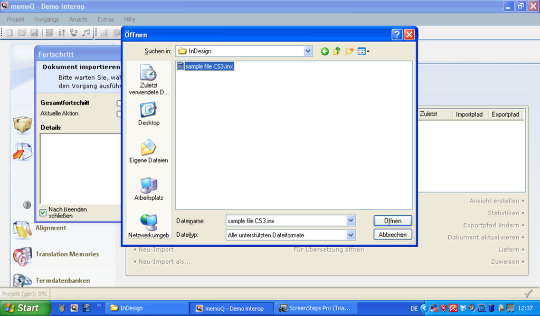
Die zu importierende Datei wird in dem Dialog ausgewählt.

Datei in der Liste der Übersetzungsdateien

media_1276252905605.png
Nach dem Import erscheint die Datei in der Liste "Übersetzungen". Nach Bedarf können die Inhalte geprüft werden indem man z.B. auf die Zeile in der Liste doppelklickt. Um die externe Bearbeitung, z.B. in SDL Trados oder einfachen Schreibprogrammen zu ermöglichen, klickt man auf das oben markierte Kommando.
media_1276253260004.png
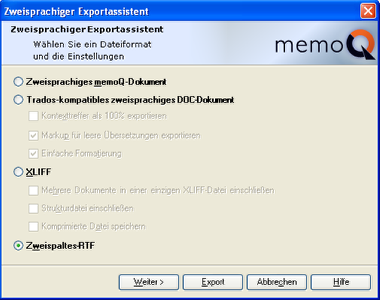
Ein Dialog erscheint in dem man zwischen diversen bilingualen Exportformaten wählen kann. Um Übersetzung bzw. Lektorat in Microsoft Word, Wordpad, OpenOffice und alle andere Schreibprogramme, die mit RTF umgehen können, wählt man die Option "zweispaltiges RTF". Mit einem Klick auf "Weiter" hat man die Möglichkeit, besondere Einstellungen für die exportierte Tabelle vorzunehmen, aber für die meisten Fälle ist das uninteressant. Klicken der Schaltfläche "Export" öffnet einen Dialog zum Speichern der zweisprachigen RTF-Datei.

Speicherdialog für die zweisprachige RTF-Datei

media_1276257458164.png
In diesem Dialog kann man den Ablageort der zweisprachigen RTF-Datei bestimmen.

Exportierte "zweisprachige" RTF-Datei (unübersetzt)
media_1276258030653.png
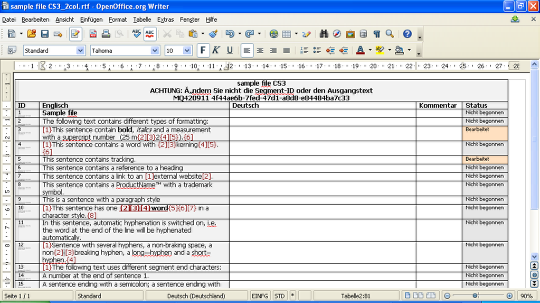
Hier ist eine Ansicht der exportierten Datei. Die Warnung, keine Änderungen im Ausgangstext vorzuhehmen ist ganz ernst zu nehmen. Der Ausgangstext enthält Fehler, aber diese müssten vor dem Export beseitigt werden, nicht in dieser Datei. Um das später zu zeigen, wurde eine Kleinigkeit im 3. Segment geändert.
Der Übersetzer schreibt den Zieltext in der Spalte rechts. Bei solcher Arbeit besteht die Gefahr, dass Tags nicht ordentlich behandelt werden, aber das kann anschließend nach dem Reimport in memoQ geprüft und notfalls korrigiert werden.
Bei einem Lektoratauftrag ist die rechte Spalte bereits mit der Übersetzung gefüllt. Kommentare können immer zum Text hinzugefügt werden; diese erscheinen später in der memoQ-Umgebung, wo sie auch als Filterkriterium dienen können.

Ansicht nach Reimport der zweisprachigen Datei

media_1276261687014.png
Hier ist das dritte Segment leer auf der Zieltextseite, weil die RTF-Datei an dieser Stelle in der Ausgangstextspalte geändert wurde. Ansonst sind alle Inhalte sauber importiert worden. Der Segmentstatus der importierten Inhalte ist auf "editiert" gesetzt so dass diese Texte auch einfach mit Hilfe des Filters geprüft werden können.

Abschließende QA-Maßnahmen möglich in memoQ

media_1276262099714.png
Die Integrität der Tags und vieles mehr kann über die integrierten QA-Funktionen in memoQ geprüft werden. Hier sind viele Einstellungen möglich.

Simple collaboration tip for using RTF tables in memoQ

The next few days will be largely occupied with a collaborative project in memoQ where the other person does not have access to a memoQ server. In earlier versions of memoQ I typically dealt with this using bilingual views in native memoQ format for exchange. These would be imported into the other project, translated, exported, the re-imported into the originating project.

This time I decided to try something different using the new RTF table export feature in memoQ version 4.2. I carried out the following steps:
  1. Set up the translation project in memoQ with all the necessary source files. Check the file's segmentation and adjust as appropriate before starting the work.
  2. Clone the project by copying it to the second translator's machine.
  3. Both persons translate agreed sections of the text.
  4. When one person's section is ready for checking, a bilingual export of the full document is made, then all rows below the header which are not part of the section to be exchanged are cut out. (I first tried to do this via a view, but I discovered that RTF exports of the views have the row numbers changed in the current version - see Gabor's tip for a better way to do this below.)
  5. The truncated RTF table is sent to the other person, who imports it into the project. Because the project was cloned and all IDs are identical, the appropriate rows will be updated. The status of the updated rows is set to "edited", making them easy to filter and proofread or feed to the translation memory by filtering, selecting and confirming the rows.
This isn't a technique I would usually have thought to use, but it is a simple, viable, low-tech solution for occasional collaboration using this translation environment tool. The attractive part of this technique for me is that a "round trip" (generating a bilingual, sending it for translation, then receiving and re-importing the translated bilingual) is not imperative. It may offer a bit of needed flexibility in some situations.

I asked Kilgray about dynamic segment range filtering for bilingual exports where the row IDs are tracked, which I think would be rather convenient for doing what I did manually by deleting rows in Step 4 above, and Kilgray's head of development, Gabor Ugray, shared the following useful tip which can be used to accomplish the same thing, perhaps with a bit more flexibility:
Just one thought here. If you click Next when creating a two-column RTF export, you have these options below:

I think the option to not include locked rows may be what you need here. I just did that last week with a translation. The documents were part running text that needed reviewing, and part tables with basically product names that did not. I first translated the running text only; with Clear translations and an on-the-fly filter, locked all other segments; then went on to export, effectively, only confirmed segments, scattered around the whole document. These were then reviewed by the agency and sent back to me, while in the meantime I happily churned away at the rest of the document on my end. As soon as the RTF is exported, you no longer need the locking within the project, I removed that right away.
Within a document, row numbers are preserved this way. (With views, they are also preserved, but of course the RTF shows the row numbers from the view itself, not the various documents on which the view is based.)

Jun 10, 2010

Choosing an agency or an independent translator

A translation colleague in Brazil, José Henrique Lamensdorf, has entertained and educated me for many years with his observations on the art and business of translation. He recently wrote an article on when to consider hiring an agency and when it is probably best to work directly with a translator. It's an excellent overview, and I agree with most, if not all the points. It is definitely worth reading here. If you are in need of translations for personal use or for your company, José's checklist is well worth taking into account.

One statement I cannot agree with is "Don't fall for the 'native speaker' talk. If a translator is truly competent, they'll have mastered the target language, regardless of where they have been born." If my memory is correct, José translates often into English, and he is most likely very good at it given the way he usually expresses himself in that language. In my own language pair I know a few people who can translate at a high level of competence into the language which they do not speak as natives, but these people are rare exceptions. More common are those who think they do so or who think that a lack of native fluency offers them some bizarre advantage. A state testing committee composed of Germans and UK English natives once decided that I translate better into German than into my own language, American English. (This was the result of the state exams I took in Germany several years ago.) However, this judgment is more a reflection of the committee's incompetence in understanding American English, not of the brilliance of my German prose. I'll admit that I can usually put together a coherent sentence in German; after 35 years of working with the language I would be rather embarrassed not to do so. But I do not believe that my writing in German or my translations into that language (done only for fun or pro bono with the rarest exceptions) in any way approach what I can accomplish in English.

Actually, given José's usual precise phrasing, I am very likely reading him wrong. I do agree that a truly competent translator will only translate into a target language that is well mastered, but the real problem is - the reason that it is so easy to misread his statement - so many believe they have this competence but do in fact not.

But I usually avoid throwing punches in the native speaker debate. I figure each person has the right to risk looking like a fool, and that applies to customers as well as service providers.